
VALENTA EMAIL DELIVERABILITY & OUTBOUND COMMUNICATION GUIDELINES
1. Current Domain Status
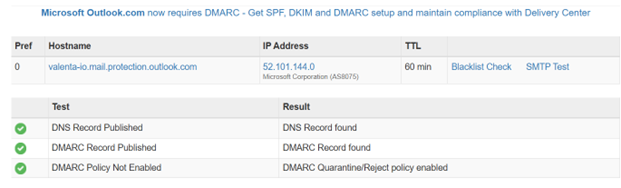
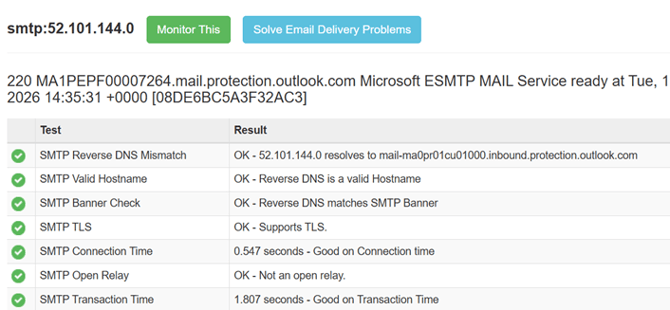
We would like to confirm that the valenta.io domain reputation has been formally verified with our webmaster and through multiple domain health analysis tools as on 18/02/2026. We have tested approximately 230+ technical parameters including authentication, security configuration, blacklist status, and email infrastructure health. All parameters returned positive results. At present, the domain reputation is classified as strong and healthy.
Below is the current status of our email domain authentication and delivery configuration.
Our report confirms that:
- SPF, DKIM, and DMARC records are properly configured
- DNS records are correctly published
- The mail server passes blacklist and SMTP validation checks
- Reverse DNS and SMTP banner validation are successful
This ensures:
Strong email deliverability, protection against spoofing, compliance with Microsoft and major email provider requirements and reduced risk of emails being marked as spam.
(Screenshot below for reference)

2. Why Email Deliverability Matters
- Ensures your emails land in the recipient’s inbox
- Protects Valenta’s brand credibility
- Improves campaign performance and response rates
- Prevents blacklisting of our domain
- Protects long-term sales capability
3. Approved Sending Platforms
Managing Partners currently use HubSpot, Apollo, LinkedIn and Dripify for outreach.
To protect our domain reputation:
- Use only one automation tool per email inbox.
- Do not run simultaneous high-volume campaigns across multiple platforms.
- Coordinate large campaigns with Marketing or IT if unsure.
4. Sending Volume Guidelines
- New email accounts must start slowly (20–30 emails per day).
- Gradually increase volume over 2–3 weeks.
- Recommended maximum per inbox: 80–120 emails per day.
- Avoid sending bulk emails from brand-new domains.
- Never send mass blasts to large unverified lists.
5. Email Content Best Practices
(For Sales Outreach, Sequences & Campaigns)
Email content plays a significant role in whether your message reaches the inbox or spam folder. Modern email providers such as Google and Microsoft evaluate not just technical settings, but also content quality, structure, user engagement, and complaint rates.
To improve inbox placement and response rates, please follow the guidelines below.
A. Structure & Tone of Sales Emails
A.1. Keep Emails Natural and Human
- Write as if you are sending a 1:1 email.
- Avoid overly formal marketing templates.
- Avoid overly promotional tone.
- Keep paragraphs short (2–3 lines max).
- Avoid long blocks of text.
Inbox filters favor natural, conversational emails.
A.2. Personalization Is MandatoryPersonalization is no longer optional for cold outreach.
At minimum:
- Personalize first sentence.
- Reference company, role, industry, or relevant trigger event.
- Avoid generic openers like:
- “Hope you are doing well.”
- “I came across your profile.”
Stronger personalization improves:
- Reply rate
- Positive engagement signals
- Domain reputation
B. Sales Sequences & Campaign Cadence
B.1. Limit Sequence Length
Recommended:
- 3–5 emails per sequence
- Space emails 3–5 days apart
- Stop after 2–3 no-response follow-ups
Do NOT:
- Send daily follow-ups.
- Send more than 6 emails in one sequence.
- Continue emailing unresponsive contacts for months.
Repeated non-engagement damages sender reputation.
B.2. Avoid Identical High-Volume MessagingDo not:
- Send the exact same email to thousands of contacts.
- Use the same subject line repeatedly.
- Run duplicate campaigns across Apollo, HubSpot, and Dripify.
Vary:
- Subject lines
- Opening sentence
- Call to action
This reduces spam-pattern detection.
C. Subject Line GuidelinesRecommended:
- 3–6 words
- Natural phrasing
- Lowercase preferred
- No clickbait
Avoid:
- “FREE”
- “Last chance”
- “Guaranteed results”
- “Limited offer”
- All caps
- Excessive punctuation
Example of good subject lines:
- “Quick question about staffing”
- “UiPath automation discussion”
- “Exploring digital assistants”
D. Links, Attachments & Formatting
D.1. Limit External Links
- Maximum 1–2 links per email.
- Avoid shortened URLs.
- Avoid suspicious tracking domains.
D.2. Avoid Attachments in Cold Outreach
Attachments trigger security filters.
Instead:
- Offer to share deck upon request.
- Send materials only after prospect replies.
- Plain text performs better.
- Avoid banner images.
- Avoid signature blocks with large logos.
Simple formatting improves deliverability.
E. AI-Generated Content Considerations
AI tools can help draft emails, but improper use can hurt deliverability.
E.1. Do Not Use Purely AI-Generated Bulk Content
Avoid:
- Copy-paste identical AI emails at scale.
- Robotic tone.
- Over-polished language.
- Excessive buzzwords.
Email providers detect:
- Repetitive structure patterns
- Over-optimized phrasing
- Mass-generated sequences
Before sending:
- Edit AI output.
- Simplify language.
- Add human nuance.
- Reduce jargon.
- Remove excessive adjectives.
AI should assist, not automate authenticity.
F. Compliance & Opt-Out Language
F.1. Always Include an Opt-Out Option
Examples:
- “If this is not relevant, please let me know.”
- “Happy to stop following up if this isn’t a priority.”
- “Let me know if I should close the loop.”
This:
- Reduces spam complaints
- Signals legitimacy
- Supports compliance with CAN-SPAM & GDPR principles
Email providers evaluate:
- Reply rate
- Delete without reading
- Spam complaints
- Forwarding behavior
- Open-to-reply ratio
To improve engagement:
- Ask simple, low-friction questions.
- Avoid long pitch explanations.
- Use soft calls to action.
- Offer value before asking for meeting.
Example:
Instead of:
“Can we schedule a 30-minute demo?”
Use:
“Would it make sense to explore this further?”
F.3. Volume & Content AlignmentHigh volume + poor content = domain damage.
Always ensure:
- Personalized content increases as volume increases.
- Cold campaigns use dedicated outreach domain if possible.
- Daily volume per inbox is controlled.
- Sudden drop in open rates
- High bounce rate
- Spam complaints
- Platform restrictions
- Outlook inbox placement but Gmail spam
If observed:
Pause campaigns and notify IT immediately.
Before launching any campaign, ask:
✔ Is this personalized?
✔ Is it conversational?
✔ Is it under 150 words?
✔ Does it avoid spam-trigger words?
✔ Does it include a soft opt-out?
✔ Is volume controlled?
✔ Is only one automation tool being used per inbox?
If all answers are yes — campaign is likely safe to proceed.
6. List Quality & Data Hygiene
- Do not use purchased or scraped lists without validation.
- Use verified email data whenever possible.
- Remove bounced emails immediately.
- Do not repeatedly email unresponsive contacts.
- Segment outreach by industry or region for better targeting.
7. Tracking & Metrics Awareness
Email open rates may appear inconsistent due to privacy features used by Google, Microsoft, and Apple.
Best practice:
- Focus on replies and meetings booked.
- Do not rely solely on open rate metrics.
- Avoid excessive tracking links in cold outreach emails.
8. Warning Signs to Watch For
- Sudden drop in open rates
- Increase in bounce rates
- Prospects reporting emails going to spam
- Platform sending limits or restrictions
If you observe any of these, pause campaigns immediately and notify Marketing.
9. Shared Responsibility
Email deliverability is a shared responsibility. Every email sent contributes to Valenta’s domain reputation. By following these guidelines, we ensure sustainable outreach capability and protect our brand.